Team Zissou Uniform

So I’m back to working on the Team Zissou uniform after starting it alllllllll the way back in Covid. I got as far as cutting out all the fabric parts for the shirt but then not moving onto actually sewing it all together. Three day monk, three day monk!

After some battles getting the ancient sewing machine working I am now ready to start putting it together.

Intended look of the final shirt:

Singer Merritt 157 Panoramic Sewing Machine Manual

Just posting this as I spent about 2 hours trying to identify the sewing machine I have access to and trying to find the manual

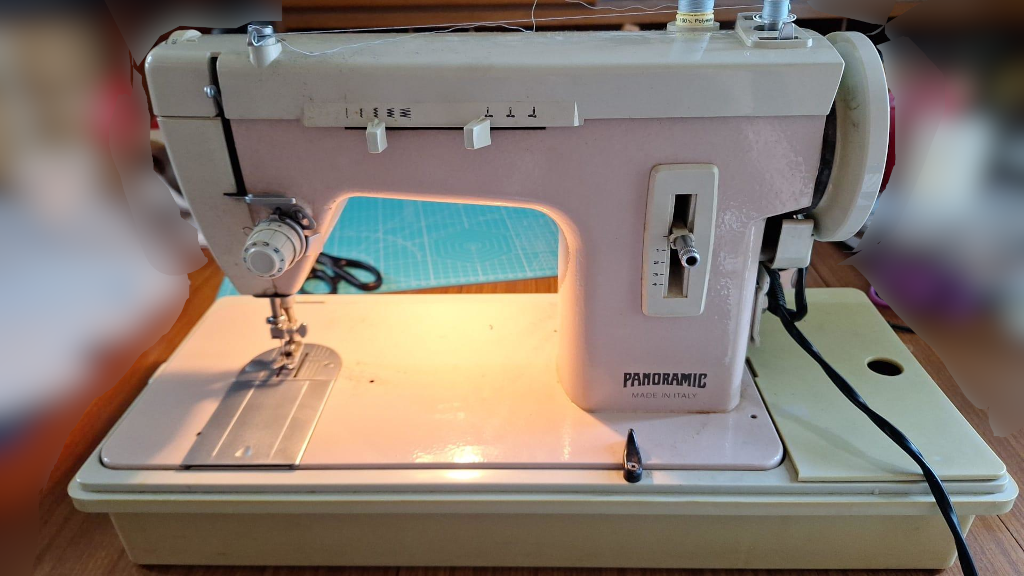
The below link is a PDF for the sewing machine Singer Merritt 157 Panoramic Sewing Machine. The one I’m using is pink and has the text Panoramic Made in Italy on it and nothing else. There are similar models with the Singer logo on.

The manual images were done by Reddit user ScareMeSometimes so full credit to them for this document. The images were originally saved as JPEG images on imgur – I wanted them in a single document so have created this PDF.

Machine looks like this -:

Other things I’d like to make

Recently I’ve been trying to brain storm things I might actually be able to make with the materials, tools and skills I have already -:

  • Robot WALL-E
  • Old school large format camera
  • Team Zissou / The Life Aquatic uniform (actually started this)

Now just to get over the hump and stop being a chronic never-finisher.

“The Japanese idiom, mikka bouzo, translates literally as: ‘three-day monk’. It is used in reference to a person who easily gives up after starting something new.” Uh oh.

Looking around online, it’s given me more fuel for the theory I’m probably ADHD-inattentive.

Frustrations of the work 3D Printer

Nothing like getting the work 3D printer working almost as perfect as it can get, then the next day the SKR mini E3 3.01 main board blows randomly when turning it back on, after just 2 months.

In the last 6 weeks the original Y-stop also broke and whatever was used to push against it originally had fallen off or was misaligned so had to improvise a quick solution (hello sticky cable holder pad) which has worked well so far.

I’ve also replaced the glass bed as it had a small chunk missing out of it (not all the way through) near the middle underneath, I’m assuming the hot end melted through it (!?) at some point and it had problems with prints staying stuck to it around that area.

I’m still to get the BL Touch working, I may leave this for a little while as it’s working well without it ……….. for now!

Some may say we would have been better off just buying a new, fancier 3D printer but it’s been a nice little project to get going again when I’ve had some spare time here and there.

Wanhao i3 Duplicator 3D printer upgrade to BIGTREETECH SKR Mini E3 V3.01 with TFT35 – Marlin Config Files / firmware

I’ve been rebuilding work’s 3D printer after the original 3D printer was stripped for working parts to get another printer working which has now been transferred elsewhere. Upon finding 3 broken Melzi boards in a box, I opted to purchase the Big Tree Tech SKR Mini E3 (version 3.01) to upgrade it along with a nice new touch screen.

Due to the state of the other parts, I also ordered two new fans, a new hotend, thermistor, ceramic cartridge heater and a Micro-Swiss All Metal Hotend with Slotted Cooling Block.

Upon connecting everything to the new board (and having to create some new JST connectors) I found the 3D printer didn’t work straight off and needed flashing with a new Marlin configuration. I opted to use the Creality 3D Ender3 SKR Mini E3 configuration example as the base config.

The first problem was that when I tried to home the printer, the X axis would move to the right a little and the Z axis would rise slightly and do nothing else. I had to invert the X Y and Z axis to get them to function correctly, changing the following from False to True in configuration.h

#define X_MIN_ENDSTOP_INVERTING true // Set to true to invert the logic of the endstop.
#define Y_MIN_ENDSTOP_INVERTING true // Set to true to invert the logic of the endstop.
#define Z_MIN_ENDSTOP_INVERTING true // Set to true to invert the logic of the endstop.

The next problem was getting the fans to work. I connected the Extruder fan to Fan 0, the board fan to Fan 1 and set the chamber fan to Fan 2. I had to change the pin variables to get these to work. These are set in configuration_adv.h.

#define E0_AUTO_FAN_PIN PC6
#define CHAMBER_AUTO_FAN_PIN PB15
#define CONTROLLER_FAN_PIN PC7 

Finally I set the board size for the X and Y axis. These were set in configuration.h. I also amended the printer profile in my 3D printing software to match in Ultimaker Cura.

#define X_BED_SIZE 220
#define Y_BED_SIZE 220

Once compiled, I copied the updated firmware to the printer, leveled the bed and ran off three Benchy boat models to test. The first two didn’t come out great but I suspect it was due to the cheap nasty white PLA that I was using. Changing to a decent black PLA and it printed off almost perfectly and subsequent prints I’ve done have come out fine.

In future I’m hoping to get a BL-Touch clone working with it to help get even better prints with better leveling.

Underwater ROV

For a long time, I’ve wanted to make my own underwater ROV. This actually goes back at least 12 years, and while I planned some of the basics out and even created some example code, I never followed through on purchasing what was needed.

This will be another project I document my progress, failures and fixes on while linking to any resources I may have used.

I will name it the Kinnou.